

#4 categories of video redaction solutions
Before comparing individual tools, it helps to understand the 4 distinct categories in this market and their trade-offs, so that you can focus on the solution category that matches your requirements.
| Category | What you get | What you give up |
|---|---|---|
|
Multi-purpose tools with redaction capabilities
e.g. Reduct Video
|
Primarily used for interview-based conversations. | Limited scalability — automated PII detection not supported. Cloud data privacy concerns. |
|
Cloud-based redaction platforms
e.g. Reduct Video
|
Fast deployment, no hardware setup, accessible anywhere. | Cloud data privacy concerns: footage leaves your environment. Data residency concerns for regulated sectors. Minute-based pricing means a less predictable redaction budget. |
|
On-premise video redaction
e.g. Identity Cloak,Caseguard
|
Full data control, no cloud transfer, predictable pricing. | Hardware needs to meet recommended requirements for fast processing. |
|
CCTV system plug-ins
|
Redaction stays inside your existing VMS — no separate export/import step. | Feature set may be narrower than standalone tools, including video import limitations for complex projects. |
Below, we'll introduce the most relevant Secure Redact alternatives across these categories, so you can compare them based on your requirements.
#Secure Redact alternatives to consider
#[1] Identity Cloak: on-premise video redaction and Milestone plug-ins
Identity Cloak is available as an on-premise video redaction tool and Milestone plug-ins for video redaction of live and recorded footage. Our solution is used across 23 countries by organisations like River Island, Tate Museum, Córas Iompair Éireann (CIÉ), and more.
What makes Identity Cloak different
In our conversations with prospects and customers, we’ve noticed that many of them share the same frustrations with existing solutions:
Minute-based pricing plans create uncertainty
Many platforms place limits on the number of videos that can be processed per month. This becomes an issue for organisations dealing with long, detailed SARs or going through a spike in footage requests.Face-only blur mode without other types of redaction
Redacting faces alone may leave bodies, clothing, and identifying features visible, which creates compliance risks. For example, in sensitive environments it may be necessary to blur the whole area, only leaving the subject of interest visible. Or, you may need to blur out full bodies because of distinctive clothing.VMS integration gaps
Organisations running Milestone XProtect or similar VMS platforms often have to export footage manually before redacting it, then re-import the output. This adds friction, breaks chain-of-custody workflows, and creates version control problems.
Identity Cloak is available as a desktop solution with per-video, predictable pricing and as a Milestone XProtect plug-in. Both options have flexible blur shape, size, and density options and automate detection and redaction for people and vehicles.
Read more about using Identity Cloak for video redaction below.
#Identity Cloak for desktop
Identity Cloak installs on your device, runs behind your firewall, and processes footage locally — no video data is transferred to external servers. Identity Cloak's AI can handle footage from a wide range of sources, including CCTV, bodycams, dashcams, and mobile phone videos, plus legacy video formats.
The redaction workflow runs in four steps:
Import and trim footage
Run autotracking (faces, bodies, licence plate)
Adjust and finalise your redaction
Review and export
On recommended hardware, users complete a full redaction from import to export in under 12 minutes on average.
Here’s a brief overview of Identity Cloak desktop capabilities:
Full-body, head, and licence plate blur

Auto-detection and tracking masks faces, full bodies, and licence plates. AI tracks people or vehicles across the entire clip, including fast-moving subjects, crowded scenes, and low-quality footage.
Layered blurring for static objects
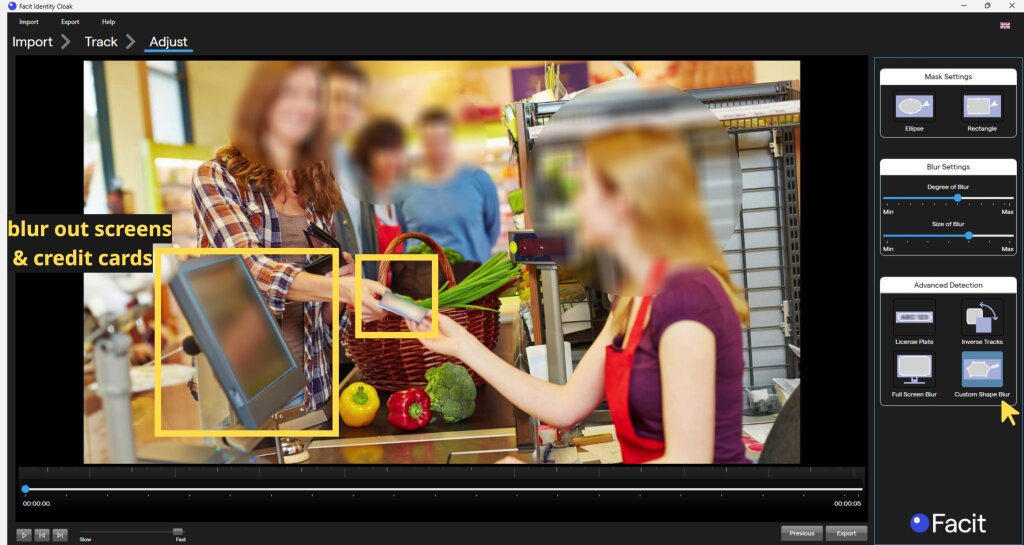
Custom square and elliptical blur tools let you permanently mask static elements like signage, screens, ID badges, and notepads. If a person of interest walks through a blurred area, they remain visible while the background stays redacted.
Audio redaction

Redact audio directly inside Identity Cloak without exporting to a separate tool. Protect names, addresses, and other identifying information in bodycam, dashcam, CCTV, meeting, and call recordings.
Video trim

Remove irrelevant sections of footage before export to ensure only the relevant portion is disclosed. This reduces review time and limits what's released to strictly necessary clips.

I think one of the Identity Cloak advantages is that it is not complicated. The video redaction software is a very stable system that provides you with a number of useful tools and works in different environments.
Per video pricing, no limits on file size or duration
Most redaction platforms charge by the minute of processed video. Identity Cloak plans are based on the number of exported videos, with no limits on video file size or video duration:
Starter: 10 videos per year
Standard: 35 videos per year
Pro: 125 videos per year, unlimited videos
Enterprise: fixed-price, unlimited videos, device licensing available
For Starter and Standard plans, additional videos can be purchased at a flat per-video rate and rolled over if not needed.
The investment in Identity Cloak is value for money, there are many ways in which the software has paid for itself, from risk and reputation management to cost-effective compliance with GDPR, as failure to comply with GDPR carries hefty fines.
#Identity Cloak API and Milestone plug-in options

For organisations running on Milestone, Identity Cloak has dedicated plug-ins that integrate directly into XProtect.
Milestone Playback plug-in redacts recorded video footage. It is compatible with all Milestone stream types (body-worn, PTZ, 360°, and fixed dome cameras) and has been tested on XProtect Corporate versions 2023, 2024, and 2025.
Identity Cloak also offers API integration hosted on AWS or Azure, allowing you to embed redaction into existing applications and workflows.
See Identity Cloak in action
#[2] CaseGuard: on-premise multimedia redaction
CaseGuard is a redaction platform covering video, audio, documents, and images from a single desktop application.
CaseGuard's strength is its breadth — it handles more file types and redaction categories than most competitors, and the on-premise architecture means data never leaves the organisation's environment.
Pricing runs from $279/month (Doc Suite for document and image redaction) to $379/month (Ultimate Suite for media, text-based, video, and audio), billed annually.
CaseGuard is a strong fit for: organisations that need to be able to handle multiple types of redaction in a single tool.
Less suited for: organisations whose primary use case is video footage rather than mixed evidence files.
#[3] Reduct.Video: cloud platform for text-based video redaction
Reduct.Video is a text-based video editing and transcription platform. It's not a purpose-built redaction tool — it's primarily used to search, edit, and clip large volumes of footage.
Its redaction capability is transcript-based: you identify and remove spoken PII (names, addresses, sensitive phrases) by editing the transcript. This makes it useful for interview-heavy workflows.
Video redaction features are available on Professional and Enterprise plans, starting at $40 per editor per month (yearly subscription). GDPR & CCPA agreements and SOC2 reports are available on the Enterprise plan.
Reduct.Video is a strong fit for: teams that want to handle redaction based on transcripts, with audio-redaction-first workflows.
Not suited for: high volumes or complex redaction projects, projects that require more than object or face blurring, such as footage of sensitive environments.
#[4] Axon Redaction: built-in Axon video redaction tool
Axon Redaction is designed specifically for law enforcement agencies that already use Axon body cameras, dash cameras, and interview room systems, and is only available to Axon Evidence customers.
Axon Redaction is a strong fit for: law enforcement agencies already using Axon Evidence that want redaction integrated directly into their existing evidence management workflow.
Not suited for: any use case outside the Axon ecosystem, agencies using non-Axon hardware or evidence systems.
#How to choose the right tool: a quick guide
If your primary requirement is cloud-based redaction with secure data processing for the US, UK and Europe, Secure Redact is worth a look.
If your use case is transcript-based spoken PII removal, Reduct.Video fits that specific workflow.
For Axon users, relying on Axon Redaction is an easy decision.
You may want to consider Identity Cloak if your organisation is looking for a solution that would offer:
On-premise processing so footage never leaves their environment
Per-video pricing with no limits on file size or video length
Flexible blur options, audio redaction, and licence plate detection available in a single tool
Enterprise scalability from a single user to multi-site, multi-user deployments
Start a free 7-day trial to test Identity Cloak on typical footage types that your organization needs to redact.
#Related articles
Best video redaction software: what to look for (and a full Identity Cloak walkthrough)
Cloud-Based vs On-Premise Video Redaction: Where Should You Redact Video Footage?


